ZipStyle: Zipper Lock Screen
BUGUN SOFTWARE COMPANY LIMITEDArt & Design
4.417.00 Reviews
- Version
- 1.2.4
- Installs
- 100.00K
- Age Rating
- Everyone
Screenshots
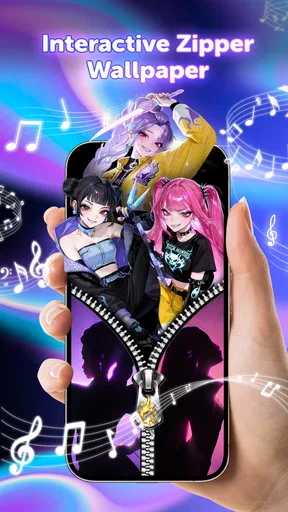
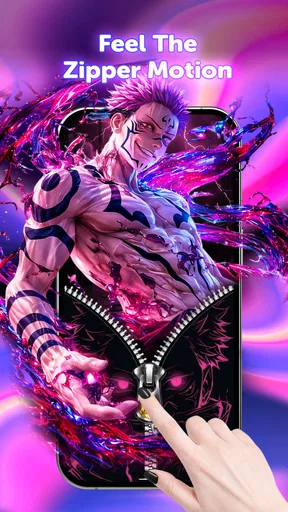
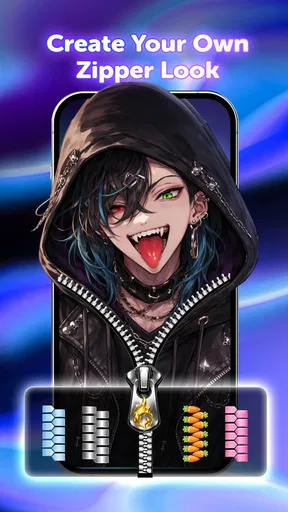
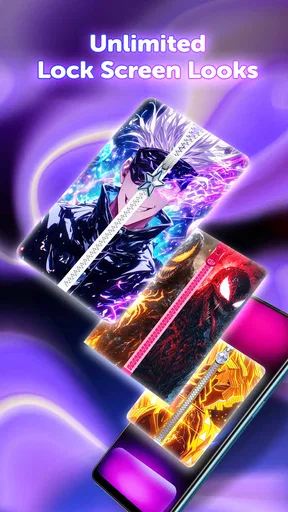
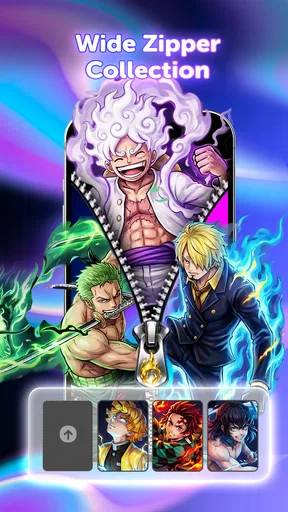
Our Review of ZipStyle: Zipper Lock Screen
 Analysis by Appyee
I tried ZipStyle: Zipper Lock Screen as a small personalization tool rather than expecting it to replace the security features already built into a phone. That distinction matters. Its purpose is visual: it gives the lock screen a zipper-inspired appearance, with wallpaper and zip-style presentation designed to make the first screen you see feel more distinctive. If you enjoy changing the look of your phone and want something more playful than a standard photograph, it has a clear appeal.
My first impression was that this is an app for atmosphere, not a complete privacy solution. The zipper effect can make a device feel themed and personal, but the real protection of your phone still comes from the operating system’s passcode, pattern, PIN, fingerprint, or face-unlock settings. I would use the app to decorate that experience, not to treat the visual zipper as a substitute for proper device security.
How ZipStyle fits into a shared household
The most convincing use case for me is a phone that is used around the home but still belongs visually to one person. Perhaps a family tablet sits on a kitchen counter, or a spare phone is passed between relatives for music, recipes, photos, and quick calls. A zipper-themed screen can make that device easier to recognize at a glance, especially when several phones are lying together.
That does not mean the app creates separate household accounts or user boundaries. I would not install it expecting profiles, parental controls, guest access, or a way to decide who can open which part of a device. Its role is much narrower: it changes the presentation of the lock screen. Any genuine separation between people must still be handled through the phone’s own user settings and the apps already installed.
For a shared device, I would choose a wallpaper that is easy to recognize without being distracting. A busy image may look attractive in a preview but become harder to read when notifications appear over it. A simpler background, with enough contrast around the clock and notification area, is more practical for a phone that several people check during the day.
There is also a useful coordination benefit that is easy to overlook. If one household member manages the visual setup, everyone else can identify the device quickly without needing to unlock it. That can prevent the familiar “which phone is this?” moment when several similar devices are charging together. It is a small advantage, but personalization often works best when it solves a small everyday annoyance rather than trying to do everything.
What the visual concept does well
The zipper idea gives the screen a recognizable theme immediately. Standard wallpaper apps often focus on photographs, gradients, illustrations, or animated backgrounds. ZipStyle takes a more specific route by making the act of opening the screen part of the design. That makes it more interesting than simply placing another image behind the clock.
I also like that the concept can suit different moods. A bright, playful style may work well on a personal phone, while a restrained image can make a shared tablet feel less childish. The important point is to judge the result from the actual lock screen rather than from the selection screen. Icons, text, notifications, and the phone’s own layout can change how attractive the final result feels.
In daily use, the novelty will probably fade for some people. That is not a flaw unique to this app; themed lock screens often feel exciting during setup and ordinary after a few days. I see the strongest value in using it when you genuinely want a visual refresh, when you are setting up a spare device, or when you want a phone to have a clear identity in a busy household.
Setting it up without confusing decoration with security
I recommend beginning with the phone’s normal lock method already configured. Set a PIN, pattern, password, fingerprint, or face-unlock option through the operating system first, then add the zipper styling. This order keeps the responsibilities clear: the phone handles access control, while ZipStyle handles appearance. If the visual effect ever becomes inconvenient, you can remove or change it without losing the core security habit.
Before applying a design, I would also check how the wallpaper interacts with the device’s existing lock screen. Phones differ in the way they display clocks, notifications, shortcuts, and biometric prompts. A zipper graphic may sit neatly on one model and feel crowded on another. The practical test is simple: lock the phone several times, wake it in different lighting, and make sure the important information remains readable.
One of my more useful setup tips is to test the screen with real notifications rather than an empty preview. A wallpaper that looks balanced when nothing is displayed may become visually cluttered when messages, missed calls, and media controls appear. On a shared phone, this matters even more because people may rely on the lock screen for quick information without opening the device.
I would also avoid treating every decorative prompt as permission to change system behavior. Read each screen carefully and keep the phone’s built-in settings in charge of authentication. If the app presents an option that affects how the lock screen appears, consider whether it improves recognition or merely adds another step. The best setup is the one that looks different while remaining predictable.
Because this is a visual customization app, it is worth checking the result after restarting the device and after switching between portrait and landscape where relevant. A design can appear correct during the initial setup but feel less polished after the phone returns to its ordinary system state. I would not call that a reason to avoid the app, but it is a sensible part of testing any lock-screen customization.
Boundaries that matter on a family device
For children, I would explain that the zipper is a style, not a promise that the phone is private. Younger users can easily assume that a decorative opening gesture is the actual protection. Showing them the real unlock method helps prevent confusion, especially if the device contains school accounts, family photos, or communication apps.
For older relatives, simplicity may be more important than novelty. A high-contrast design with a clear clock is likely to be more useful than a dramatic image with fine details. I would set it up together, ask whether the text is easy to read, and leave the normal system unlock method unchanged. The app can make the screen friendlier, but it should not make access less obvious.
On a device shared by adults, the main boundary is expectation. Everyone should know whether the phone is merely recognizable or actually protected. ZipStyle can help with the first task. It cannot establish separate accounts, hide private conversations from another person who already knows the device passcode, or coordinate permissions between household members. Those decisions belong elsewhere.
Coordinating the look across everyday use
A themed lock screen works best when it supports the way a device is used. For a family tablet, I would select a calm background and keep the design consistent with the home screen. For a personal phone, I might choose something more expressive, but I would still check whether the wallpaper makes app notifications difficult to scan.
One practical workflow is to take a quick screenshot of the lock screen after applying the style and show it to anyone who regularly uses the device. That gives household members a visual reference before they start asking whether the phone has changed or whether something is wrong. It also makes it easier to agree on a shared device’s appearance without repeatedly unlocking it to demonstrate the effect.
Another useful approach is to use the zipper theme as a visual label rather than changing designs constantly. If every device in the home receives a different style, recognition becomes easier. If the appearance changes every day, that benefit disappears. I would choose one look for a spare or shared device and only change it when there is a real reason, such as a seasonal refresh or a new owner.
There is a trade-off between personality and quick access. Decorative elements may encourage someone to pause and enjoy the screen, but people often check a shared device because they need information quickly. If the design competes with the clock or notification text, I would select a simpler option or return to the phone’s ordinary wallpaper. A customization that slows down routine use is not worth keeping merely because it is unusual.
The app may also appeal to someone who likes coordinating a phone with a room, outfit, event, or personal theme. I would treat that as an occasional creative project rather than a permanent obligation. Set up the visual style, use it for a while, and change it when it stops feeling useful. The low-pressure nature of a free app makes that experimentation easier, but the result still depends on choosing an image that works with the phone’s interface.
Who will appreciate it, and who should skip it?
I think ZipStyle is a good fit for people who find ordinary lock screens dull and want a clearly themed alternative. It is especially suitable for users who enjoy customizing their phone, households that want an easy visual identifier for a spare device, and anyone who likes the zipper concept more than a conventional static wallpaper.
I would be less enthusiastic about it for someone seeking stronger privacy, separate family spaces, child supervision, or a replacement for the phone’s security system. Those users need operating-system tools or dedicated solutions built for access management. A decorative lock screen cannot solve those problems, and expecting it to do so would lead to disappointment.
It may also be a poor match for users who prefer an uncluttered, minimal lock screen. If you want the clock, notifications, and biometric prompt to remain almost invisible against a simple background, the zipper theme may feel like unnecessary visual weight. In that case, a standard wallpaper or a conventional wallpaper app would probably be the better choice.
The app is free, and it is listed for everyone, which makes it approachable for casual experimentation. I would still supervise setup for younger children, not because the theme is inherently unsuitable, but because the difference between decoration and real security deserves a clear explanation. The age label tells me the presentation is broadly accessible; it does not turn the app into a family-management tool.
Performance expectations and the small frictions
ZipStyle comes from BUGUN SOFTWARE COMPANY LIMITED and has reached over one hundred thousand installs, with a 4.4 average from hundreds of ratings. Those figures suggest that the idea has found an audience, but they do not tell me whether every phone will display the theme in exactly the same way. Lock-screen behavior is strongly influenced by the device manufacturer and Android’s own interface.
The current version is 1.2.4, and the app works on Android 8.0 or later. That covers a broad range of devices, including some older phones, but compatibility on paper is not the same as an identical visual result. Older hardware or heavily customized Android interfaces can handle wallpapers and lock-screen overlays differently from newer models.
My main reservation is that customization apps can add another layer between what a user expects and what the operating system actually allows. If the zipper presentation does not remain active after a system update, a restart, or a change in lock-screen settings, the user may need to recheck the setup. I would not build an important household routine around the visual effect until it has proved stable on that particular phone.
There is also the ordinary maintenance question. A lock-screen app should not become a source of confusion when someone needs to answer a call, read a notification, or unlock the device quickly. If a family member struggles with the presentation, I would remove the theme rather than asking them to adapt to a decoration. Personalization should serve the user, not the other way around.
Compared with a typical wallpaper app, ZipStyle offers a more focused experience and a stronger visual identity. Compared with the phone’s built-in wallpaper picker, it is more playful but less neutral. Compared with a security utility, it belongs in a completely different category. That comparison is important because it explains both its charm and its limits: it adds character, not account administration.
My household verdict after using the zipper approach
I would recommend ZipStyle to a friend who wants a distinctive lock screen and understands that the zipper is a visual theme rather than a security mechanism. The idea is specific enough to feel different from another generic background, and it can be useful for identifying a shared or spare device quickly. The free price also makes it easy to try without committing to a paid customization package.
For household use, my advice is to set it up deliberately. Keep the phone’s genuine lock method active, choose a readable design, test it with notifications visible, and tell other users what the screen represents. Those steps prevent the most likely misunderstandings and make the theme more useful in everyday coordination.
I would skip it for a child-management need, a multi-account requirement, or a serious privacy concern. I would also skip it if the phone’s normal lock screen is already clear and comfortable and the zipper effect adds more distraction than personality. In those situations, the built-in tools or a simpler wallpaper option are better suited to the job.
Overall, I see ZipStyle: Zipper Lock Screen as a focused art and design app with a fun purpose. It succeeds when I judge it as a visual refresh and a way to give a device its own identity. It falls short only when someone asks it to manage people, permissions, or protection. Used within those boundaries, it is an easygoing customization choice for a personal phone or a carefully coordinated shared device.
Verdict
Strengths of ZipStyle: Zipper Lock Screen
- Fun zipper animation gives the lock screen a distinctive look.
- Several zipper styles and backgrounds allow basic personalization.
- Simple interface is easy to configure for most users.
- Lightweight design should work smoothly on many older devices.
- Useful for adding a playful visual touch without changing the full launcher.
Limitations of ZipStyle: Zipper Lock Screen
- The zipper effect may feel repetitive after extended use.
- Some options may require watching ads or making in-app purchases.
- Lock-screen customization can conflict with other security apps.
- Battery use may increase slightly if animations remain active.
- It may offer fewer advanced security features than built-in phone locks.
Other Releases by BUGUN SOFTWARE COMPANY LIMITED
View All
Keyboard Emoji & Sound Themes
Personalization4.3
Similar Picks in This Category
View All
Canva: AI Photo & Video Editor
Canva4.8

PENUP – Drawing-sharing SNS
Samsung Electronics Co., Ltd.4.5

Crafto
Kutumb App4.6

Sketchbook
Sketchbook4.1

ibis Paint X
ibis inc.4.5

Adobe Express: AI Photo, Video
Adobe4.6
Frequently Asked Questions
What is ZipStyle: Zipper Lock Screen and how does it work?
ZipStyle: Zipper Lock Screen is a personalization app that gives your device a zipper-inspired lock screen. After choosing a design, background, zipper style, and decorative elements, you can apply the theme to create the visual effect of unzipping the screen. Depending on your device and settings, it may work as a simulated lock screen rather than replacing the phone’s built-in security system.
Does ZipStyle: Zipper Lock Screen provide real phone security?
The app is primarily designed for appearance and entertainment, so users should not assume that the zipper animation replaces Android or iOS security features. For proper protection, keep your device’s original PIN, password, pattern, fingerprint, or Face ID enabled. Before downloading, review the app’s permissions and settings carefully, because some lock-screen customization apps may need permission to display over other applications or run in the background.
Can I customize the zipper lock screen and use my own photos?
ZipStyle generally focuses on customization, allowing users to select different zipper designs, colors, handles, backgrounds, and visual effects. Many versions also support personal images from the device gallery, although the exact options can vary by release and operating system. Check the available editor after installation to confirm whether cropping, image positioning, text, and decorative stickers are included.
Is ZipStyle: Zipper Lock Screen free to download and use?
The app may be available as a free download, but free versions commonly include advertising, optional paid features, or premium customization packs. Some effects, themes, or background collections may require an in-app purchase. Prices and subscription conditions can change, so review the store listing and payment screen before confirming any purchase. Also check whether the app offers a trial period and how cancellation works.
What should I check if the zipper lock screen does not appear or works incorrectly?
If the effect does not show, first open ZipStyle and confirm that the lock-screen feature is enabled. On Android, you may need to allow notifications, overlay access, or permission to run in the background, depending on the version. Battery-saving settings can also stop the app. Restarting the phone and disabling conflicting lock-screen applications may help. Always retain the system lock method in case the app stops responding.
